BlazeClean
- 4.4
- Rating
- 5.00M
- Installs
- Free
- Price

 Analysis by App-foxy
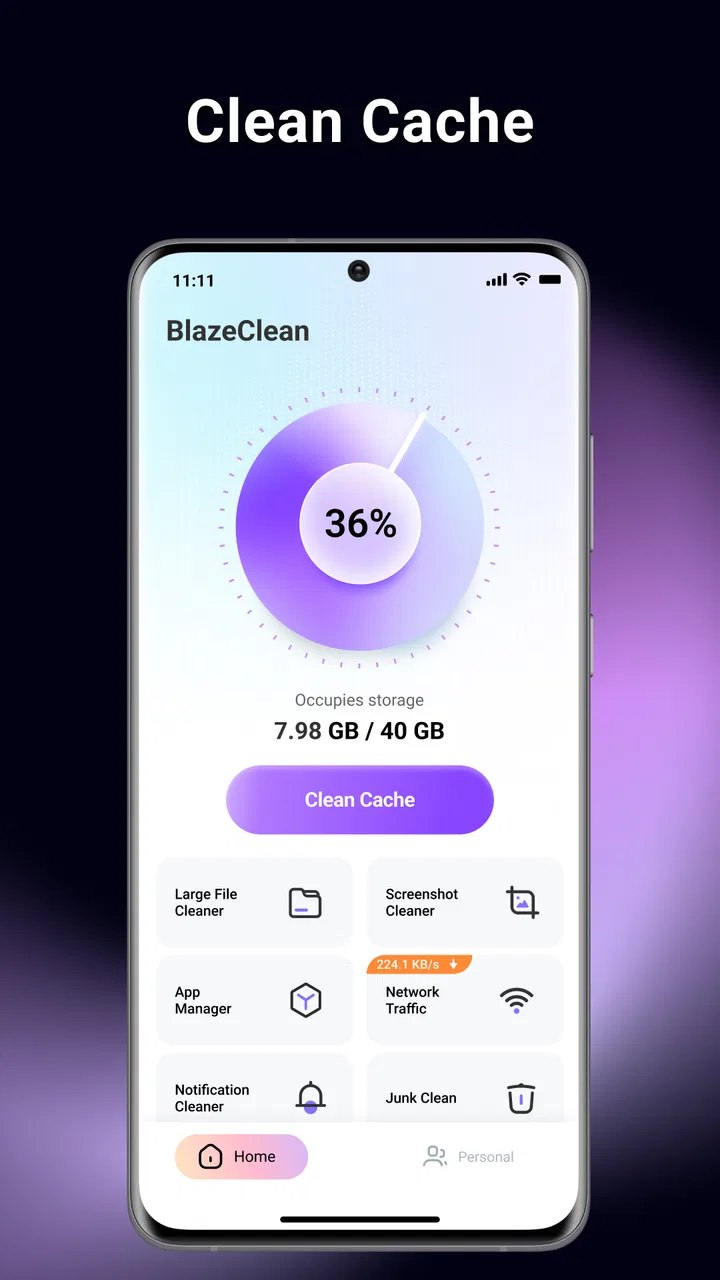
When my phone starts warning me about limited space, the problem is rarely one enormous file. It is usually a messy combination of forgotten downloads, temporary leftovers, duplicate-looking media, and apps I installed for a single task. BlazeClean is built for that exact moment. It is a free Android tools app from Alsaeed that brings storage cleanup and app organization into one place, rather than making me jump between the system settings screen and a separate file manager.
I approached it as a practical maintenance tool, not as a magic speed booster. That distinction matters. Its useful role is helping me see what is taking up room and decide what can safely leave. The store summary presents it as a way to manage storage, clear junk files, and organize apps, and that is the right way to understand it. The value is in making a neglected phone easier to inspect and tidy.
The app has reached over a million installs and carries a 4.3 average from around 4.2 thousand ratings, which suggests that its simple purpose is connecting with a fairly broad Android audience. It is free, rated for Everyone, and works on Android 7.0 or later. Alsaeed lists the current release as V1.0.2, with the app released on February 6, 2026. Those details make it accessible to people using both newer phones and older supported devices.
You May Also Like

 Blood Strike: 2.5 Anniversary
Blood Strike’s Loadouts Turn Every Drop Into a Tactical Gamble
A close look at Blood Strike’s custom loadouts: how fast access to signature weapons reshapes its battle royale rhythm, rewards preparation, and narrows the gap between fights.

 Pandora - Music & Podcasts
Pandora’s Music Is Easy to Start, but Harder to Recover
Pandora’s strength is its low-effort path from a seed to a station. Its weak spot is how much confidence it asks you to place in connection, setup, and quiet recovery.

 8 Ball Pool
 Is Built on Rivalries, Rematches, and Routine
A close look at the rivalries, rematches, shared routines, and unanswered safety questions that turn a quick pool match into a persistent mobile community.

 Samsung Music
’s Quiet Strength Is Playing What You Already Own
Its reach comes less from spectacle than from dependable access to a personal library. That simplicity is both the app’s strongest retention engine and its ceiling.

 AccuWeather: Weather Radar
AccuWeather Review: A Quick, Clear Forecast for Everyday Decisions
For everyday plans, the best forecast is the one you can understand quickly. AccuWeather makes rain timing, radar, and local conditions easy to act on, with a few trade-offs.

 Hill Climb Racing
Why Hill Climb Racing Still Turns Crashes Into One More Run
A tiny car, a bumpy hill and one more upgrade: Hill Climb Racing keeps resurfacing because its simple chaos makes every near-miss feel personal.
More From Our News Desk



From a crowded phone to a clearer storage plan
I find it helps to treat a shared phone’s storage as a household resource, not a pile of files that anyone can clear at will. In this section, I’ll focus on how to make a cleanup session deliberate when several people rely on the same device, then turn to the simple boundaries that keep personal files and app decisions in the right hands.
Starting with the actual storage problem
My first recommendation is not to open any cleaner and immediately approve every suggested deletion. I begin by asking what I am trying to fix. If photos and videos are the main issue, an app organizer will not create meaningful space by itself. If the phone feels cluttered because many unused apps are installed, the app-management side of BlazeClean becomes more relevant. If temporary files are the cause, its cleanup workflow is the natural starting point.
This small pause prevents a common mistake: treating all occupied storage as junk. A downloaded document I still need is not junk simply because it has been sitting in a folder for months. The same applies to offline media, exported videos, and app data that may look unfamiliar. I find a storage tool most helpful when it turns a vague warning into a review queue, while I remain responsible for the final decision.
BlazeClean is especially suited to someone who wants a single, approachable place to begin. I would consider it for a family member who does not want to navigate several Android settings menus, or for myself after a period of installing and removing apps. It is less compelling for a person who already has a disciplined folder system and regularly audits storage through the built-in Android tools.
The first pass: inspect before removing
After opening the app, I treat the initial scan as an inventory rather than a command. The useful handoff here is from the phone’s scattered storage information to a more focused cleanup view. Instead of remembering which apps I have not opened recently or where temporary clutter might be hiding, I can use the app as a prompt to examine those areas in sequence.
The safest workflow is to review categories one at a time. I start with the items that are easiest to understand, then move toward anything that could affect an app’s state. A visible temporary file is usually easier to judge than an unfamiliar package or a large block of application data. That order reduces the chance of cleaning aggressively just because the interface makes it convenient.
I also prefer to work while the phone is not in the middle of an important task. A cleanup session is better when I am not waiting for a navigation route, recording a voice note, or preparing to send a large attachment. This is not a BlazeClean feature; it is simply good workflow design. Storage maintenance involves decisions, and rushed decisions are where useful files get removed.
Clearing junk without confusing it with personal files
The junk-cleaning part is most useful when I think of it as housekeeping. Temporary remnants can accumulate as apps update, browsers cache content, and services process files. Removing unnecessary leftovers may make the storage picture easier to manage, but I do not assume that every suggested item is worthless. I read the category and context before confirming anything.
My practical rule is to preserve anything with an obvious personal meaning. A file with a recognizable name, a recent creation date, or a connection to work, travel, school, or family deserves a second look. Cleanup tools are strongest at reducing uncertainty around disposable clutter; they are not substitutes for a backup routine. If a file matters, I move or copy it somewhere safe before using a cleanup action.
One non-obvious benefit is that a cleanup pass can reveal a behavioral pattern. If the same kind of temporary material keeps returning, the real solution may be changing how I use a browser, messaging app, or media service. BlazeClean can help me notice the symptom, but it cannot replace the decision to stop repeatedly downloading the same content or keeping unnecessary offline copies.
Organizing installed apps as a separate decision
The app-management workflow is different from junk cleanup, and I like keeping those decisions mentally separate. Removing an unused app can recover more meaningful space than deleting a handful of small leftovers, but it also changes how I use the phone. I review the list with three questions: Do I recognize the app, do I still use it, and would reinstalling it later be inconvenient?
This is where BlazeClean can act as a bridge between storage management and everyday organization. An app that has not been opened recently may still be important for a rare event, such as travel, banking, work access, or a building entry system. I do not uninstall based only on inactivity. I check whether the app stores local information, supports a device or accessory, or is difficult to set up again.
A useful handoff is to make a short removal group rather than deleting everything in one sweep. I select only apps I can identify confidently, then revisit the remaining list. This two-stage approach is slower than a single bulk action, but it gives me a chance to notice dependencies. For example, an app that looks unnecessary may be the companion for hardware I use only occasionally.
What happens after a cleanup decision
The result of a cleanup should not be judged only by whether the phone feels faster. The clearest outcome is a more understandable storage situation: fewer disposable files, fewer forgotten apps, and a better idea of what deserves attention next. I check the phone’s available space afterward and then open the apps I rely on most. That confirms that the handoff from BlazeClean back to normal phone use went smoothly.
I also give the phone a short settling period. Some changes are immediately visible, while others become apparent only when I return to messaging, browsing, photography, or downloading. If an app behaves differently after its data has been altered, that is a sign I should be more conservative in future cleanup sessions. The point is not to maximize deletion; it is to improve the phone without creating a new problem.
For a realistic everyday example, imagine returning from a weekend trip with a phone full of screenshots, downloaded maps, shared videos, and a few temporary files from editing an image. I would first preserve the photos and travel documents, then use BlazeClean to inspect disposable clutter and review apps installed for the trip. The outcome I want is not an empty storage screen. I want the important memories intact, the temporary material reduced, and the travel-only apps removed if I no longer need them.
The handoff between BlazeClean and Android settings
No cleaner should be treated as the only authority on a phone’s storage. Android’s own settings remain valuable because they are close to the operating system and often provide the clearest context for an individual app. I use BlazeClean for discovery and organization, then turn to system settings when I need to inspect a specific app, verify its storage impact, or understand what a reset would mean.
This division of labor is one of the most important practical insights. BlazeClean is convenient when I want a broad starting point; Android settings are better when I need a detailed, app-by-app decision. A dedicated file manager is still preferable for manually sorting personal documents, renaming folders, or moving media. Cloud storage is the better answer when the real issue is preserving files rather than deleting them.
In other words, BlazeClean sits between a general storage overview and a manual file-management session. It can reduce the effort needed to find cleanup opportunities, but it does not remove the need for judgment. I would not use it as a replacement for backups, photo organization, or a careful archive system.
Where the flow becomes uncomfortable
The main friction in this kind of app is trust. The moment a tool asks me to remove files or uninstall apps, I need clear enough context to understand the consequence. A broad “clean” action may be convenient, but I prefer itemized review and deliberate confirmation. If the app’s suggestions feel too general, I slow down and verify them through Android or a file manager before proceeding.
Another limitation is that cleanup cannot solve every storage bottleneck. Large camera videos, downloaded movies, offline music, and chat attachments may dominate the phone’s capacity while being perfectly legitimate files. A junk cleaner can leave those untouched, and that is appropriate. The solution then becomes transferring, archiving, or deleting personal media—not repeatedly scanning for temporary leftovers.
There is also a trade-off between simplicity and control. A focused cleaner can be easier than exploring multiple system screens, but a simpler workflow may expose less detail than an advanced file manager. I would choose BlazeClean when I want guidance and a broad maintenance pass. I would choose a manual tool when I need exact folder-level control or when the files have high personal or professional value.
Who should use it, and who should skip it
I think BlazeClean is a good fit for Android users who regularly run out of space, accumulate unused apps, or feel unsure where to begin with phone maintenance. It is also useful for people who prefer a guided review instead of hunting through storage menus. Because it is free and supports Android 7.0 and later, the entry barrier is low for many devices.
I would be more cautious about recommending it to someone who already uses a detailed backup and file-archiving routine. That person may gain little from another overview layer. I would also steer away from aggressive cleanup for anyone managing sensitive work files, shared devices, or a phone with important offline content unless they are willing to inspect every proposed action carefully.
The age rating of Everyone makes the app broadly approachable, but an Everyone rating does not mean every cleanup decision is consequence-free. Younger users or less technical family members may still need guidance before removing files or apps. The best setup is to explain what should never be deleted casually and to keep important files backed up independently.
My final workflow and verdict
My preferred routine is simple: identify the storage pressure, scan for an overview, review junk cautiously, examine installed apps separately, confirm the phone still works normally, and then use Android settings or a file manager for anything that needs deeper inspection. That workflow gives BlazeClean a clear job without asking it to become a backup service or a complete file-management system.
After using it this way, I see the app’s strongest quality as convenience with a practical focus. It gathers the first steps of storage maintenance into a friendlier process than searching through scattered menus. The trade-off is that convenience can encourage overconfidence, so I would never approve cleanup blindly. The best result comes from using BlazeClean as a decision aid, not as an automatic broom.
For a free tools app, BlazeClean makes sense when the immediate goal is to regain control of a cluttered Android phone. Its 4.3 average and over a million installs show that many people are finding value in that role, while the current V1.0.2 release keeps the product relatively focused. I would recommend trying it if your storage warning has become a recurring annoyance and you want a guided starting point.
My final recommendation is therefore positive, with one condition: keep your important files backed up and review suggested removals with care. If you need a quick, approachable way to inspect junk and organize installed apps, BlazeClean is worth considering. If you need precise file transfers, archival tools, or complete visibility into every folder, pair it with Android’s own controls or a dedicated file manager instead. Used within those boundaries, BlazeClean is a practical companion for turning a crowded phone into a more manageable one.
FAQs for BlazeClean
01What is BlazeClean, and how does it work?
BlazeClean is a mobile application designed to optimize your device's performance by cleaning junk files, managing storage, and enhancing battery life. It works by scanning your device for unnecessary files and processes, providing you with options to clear cache, remove temporary files, and identify apps that consume excessive resources. Its intuitive interface makes the cleaning process quick and straightforward.
02Is BlazeClean safe to use on my device?
Yes, BlazeClean is safe to use. The app is developed with user privacy and security in mind. It only accesses files and processes necessary for optimization and does not store or share any personal data. Furthermore, BlazeClean is regularly updated to ensure compatibility with the latest Android and iOS security standards, providing a reliable and secure experience.
03Does BlazeClean require a subscription or is it free to use?
BlazeClean offers a free version with essential cleaning features. However, there is also a premium subscription available that unlocks advanced functionalities, such as real-time monitoring, deep cleaning, and priority support. The subscription is optional and designed for users who wish to maximize the app's capabilities.
04How does BlazeClean improve battery life?
BlazeClean enhances battery life by identifying and disabling apps running in the background that are consuming power unnecessarily. It provides suggestions to adjust device settings, such as brightness and connectivity options, to conserve energy. The app's battery optimization feature helps extend the time between charges by ensuring your device operates efficiently.
05Can BlazeClean speed up my device's performance?
Yes, BlazeClean can significantly improve your device's performance. By clearing junk files, freeing up RAM, and optimizing storage, the app helps reduce system lag and increase responsiveness. It also offers tools to manage startup apps and background processes, ensuring your device runs smoothly and efficiently.
Pros
- User-friendly interface is intuitive.
- Fast cleaning process improves device speed.
- Customizable cleaning options.
- Supports multiple languages.
- Regular updates enhance functionality.
Cons
- Contains in-app ads that can be intrusive.
- Limited features in the free version.
- Requires internet for optimal use.
- Battery consumption can be high.
- Occasional crashes reported by users.

BlazeClean
Gallery